Volunteer Interview Questions

Interviews with volunteers should be informal and a two-sided conversation.

These suggested questions are to help you think about how best you and the volunteer can understand whether this would be the right role for them.

  • Why are you interested in volunteering for this role?
  • How can we help you get the most out of volunteering?
  • Are there any aspects of the role which you might find challenging?
  • Do you have any experience with [specific skill]?
  • [Describe a scenario and ask them to share their suggested solutions]
  • We’re looking for a volunteer who can give [detail the time commitment required].

How does that fit with your schedule and plans?

  • [Ask them about any other practical details e.g. timings, location, equipment]
  • We are here to support you. Please let us know either now or later any access or support needs you might have and how we can help you. This won’t impact on you being selected as a volunteer.
  •  Any questions for us?

Volunteer Induction Checklist

Below are some things you might like to consider when planning your induction for volunteers.

Welcome

  •  Explain your charity, why you involve volunteers and the difference volunteers

 make.

  •  Introduce them to key members of the team.
  •  Let them know about your code of conduct for volunteers.
  •  Confirm what name/nickname they like to use, and how their name is

 pronounced.

  •  Offer the opportunity to share the pronouns they’d like to use – the best way to

 do this is to introduce yourself as “My name is Mary and I use the pronouns

 she/her” and give them the opportunity to share

  •  Encourage volunteers to sign up to Tempo Time Credits scheme.

Practical matters

  • Health and safety
  • Fire procedures
  • Covid precautions
  • Expenses
  • How to make a cup of tea
  • Any planned times when they can’t volunteer
  • What to do if they are running late or can’t volunteer

Helping them make the most out of their volunteer role

  • Ask about their motivations for volunteering.
  • Be clear about the scope of the role and how it may develop.
  • Outline your expectations of volunteers.
  • Let them know about any volunteer socials.

Access

  • Ask about any access or support needs they may have.
  • Sometimes it takes time for volunteers to ask for support or adjustments due to

access needs – so it is good practice to let all volunteers briefly about how you

can support with that.

Voluntary and Community Sector Code of Conduct

Volunteering Kingston Code of Conduct for the Voluntary and Community Sector sets out the essential principles for running a successful and sustainable volunteering programme. It provides an overarching framework for good conduct and a benchmark of good practice. The Code of Conduct has been adapted by the Volunteering Kingston team, inspired by the principles of the London Volunteer Management Charter created by Greater London Volunteering.

  • Equality, Diversity and Inclusion – Volunteering should be open to all, and volunteers must be treated with fairness, dignity and respect regardless of age, disability, gender reassignment, marriage and civil partnership, pregnancy and maternity, race, religion or belief, sex, and sexual orientation.
  • Recruitment process – Recruitment procedures are fair, efficient and consistent.
  • Suitable volunteering roles – Volunteering roles should not replace paid staff and organisations should take proactive steps to avoid any suggestion of job substitution. Organisations should not use our platform to recruit for political activists or other roles which could be seen as contentious.
  • Expenses Policy – Volunteers should not be left out-of-pocket for their volunteering. If organisations and groups which involve volunteers cannot currently pay expenses, volunteers should be made aware of this when they join or apply for the role.
  • Induction/Briefing – Volunteers know what they are expected to do and know who they can report to. Roles must be clearly defined and provide inclusive and purposeful opportunities to volunteers.
  • Support and supervision – A named supervisor (or Lead Volunteer) should be identified and ongoing support appropriate to the role should be made available to all volunteers. Volunteers are provided with appropriate training to carry out their role, and signposted to relevant development opportunities.
  • Safe volunteering environment – Volunteers should feel that they are in a safe and supportive environment. The physical and emotional risks of volunteering are identified, minimised and covered by adequate insurance. All relevant Covid-19 guidelines, national and local, are followed.  Volunteers should be made aware of all policies and procedures in place.
  • Resolving difficulties – Volunteers know how to raise a concern and how it will be handled. If a volunteer feels unsafe or uncomfortable while volunteering they have the right to leave at any point.
  • Reward and recognition – The organisation or group should express appreciation to the volunteers by informally and formally thanking their volunteers for their time and energy.
  • Reporting – Organisations maintain contact with Legends of the Forest and report their volunteering placements and volunteering hours gained through our brokerage service. They can either use Team Kinetic website to record hours or send a quarterly estimate to the team.
  • Data protection – Organisations should follow the law and best practice on handling volunteers’ data.

By advertising your roles with Volunteering Kingston you are agreeing to the Code of Conduct. If Volunteering Kingston have reason to believe your organisation has failed to comply with the Code of Conduct, Volunteering Kingston may choose to suspend your organisation from our database until we know that you are following our basic expectations.

Volunteering Kingston is here to support your organisation or group to provide volunteers with the best experience. Contact the Volunteering Kingston team to find out more about our organisational support and guidance: enquiry@volunteeringkingston.org.uk or call 0300 365 9980.

Top tips for creating a new opportunity

Once your account has been approved by Volunteering Kingston, you can create and add new volunteering opportunities. Just simply sign into your account and click on add opportunity.

Key Details

  1. Opportunity Name – Brief title – Include the name of the activity and role e.g. Fun Run Volunteer Marshall
  2. Opportunity Description – Be descriptive – Give as much information about the role as possible, remember you are also trying to entice people to volunteer so make it sound fun and interesting.
  3. Benefits & Perks – Something to say ‘thank you’ to the volunteers. Tea and coffee provided throughout, a lunch or opportunities for volunteer training.  
  4. Skills Required – Skills that will help the volunteer get the best from this opportunity. If skills are needed offer to provide any additional or specialist training to volunteers before they begin– this could be one of the added benefits and perks
  5. Main Category – From the drop down menu what most describes the role.
  6. Activity Tags – Words you want associated to your opportunity e.g. if it was an admin role the tags could be: Admin, office, IT.
  7. Is the opportunity accessible?
  8. Opportunity part of a larger event – Do you have an event that requires many different roles and is this opportunity part of it? If yes, then choose yes from the drop down menu and you will be able to put all opportunities related to that event onto one page. If it is a one off opportunity, then choose no.

Travel Information – Some simple instructions about how the volunteer can get to your venue e.g. closest train/tube station, bus routes etc.

Expenses

Please outline what expenses you can provide.

Volunteers should not be out of pocket from volunteering. Volunteering Kingston recommend as best practice offering travel expenses and lunch for volunteer shifts over 5 hours. For shifts less than five hours, please provide volunteers with simple snacks. Volunteers should have access to drinking water and we recommend providing tea and coffee.

Files and Documents

Upload any useful documents for volunteers to download e.g. maps and itineraries.

Selection Options

  • If applying is selected the volunteer will be warned that their session choice has to be confirmed by an administrator before they can attend.
  • If joining (default) is selected then the volunteer is able to self-serve and join sessions with the expectation that they are attending.

Joining Restrictions

Please be aware that if you do have volunteers under the age of 18 you will need policies in place for the following areas:

  • Health and safety
  • Safeguarding
  • Insurance that covers under 18 volunteers

We do encourage that organisation not discriminate on age and provide all our volunteers an equal opportunity to take part. However, we do understand that certain roles require an age restriction.

Session and Times

Please select which of the three options best fits the opportunity.

Role Description: Team Kinetic Support Sheet

Tell us about the opportunity

Opportunity name

Pick something clear, descriptive, and not too long. For example:

  • Finance Admin Volunteer
  • Gardening Volunteer


Opportunity description

Assuming you are not recruiting on behalf of someone else, write from the first person plural – so “We are looking…”

Sum up the role in one sentence.

For example:

  • Join one of our busy, friendly shops, and give your time to help raise money for children in poverty.
  • We need volunteers to help with our friendly lunch for isolated older people.
  • Use your admin skills to help us keep up-to-date with our funders and make sure that we can carry on saving bees!

Alternatively, you could start with a question.

For example:

  • Got some time on your hands?
  • Do you love theatre?
  • Want to get out into the great outdoors?
  • Do you want to make the decisions that will transform Kingston into a more inclusive community?

Say a bit more about your organisation, ideally in one or two sentences.

Then say what the volunteers will do in one sentence:

  • Our Volunteer Admin Assistant will help with filing and emailing our clients.
  • Befrienders will have a zoom chat with their buddy once a week, as well as joining monthly team zoom calls.

Sum up the difference the role will make:

  • By giving your time, you will support vulnerable people to make the changes they need to get back on track.
  • By volunteering, you will help people get online, chat to their friends, be more independent and get more out of life.
  • Our volunteers have helped 80% of pupils on the programme make exceptional progress.

Say who the role is ‘ideal’ for:

  • This role is ideal for people with parenting or childcare experience who want to make a difference to vulnerable children.
  • This is a great role for a sixth former or college student who wants to champion and celebrate the biodiversity of Kingston’s parks.
  • This role is great for someone who wants to make new friends and have fun outdoors.

Write in more detail about the tasks volunteers will do. You may want to do this in a list form.

Clarify the time commitment and other practical details.

Benefits & Perks

Describe what the volunteer will get out of volunteering, for example: “Being part of a great, friendly team. Free tea and coffee. A reference if you volunteer for more than three months.”

Skills Required

List the skills required in plain, everyday English, for example: “Friendly and positive manner. Confidence in reading and writing in English. Computer literate. Experience in gardening.”

Only list skills that are relevant to the role.

What category best describes this opportunity

Select from the drop down menu the category that most accurately describes the role. Some examples of different categories are –

  • Administration
  • Culture
  • Education & Literacy
  • Children
  • Covid-19 / Coronavirus
  • Befriending / Buddying
  • Art & Design
  • Advice
  • Environment & Conservation
  • Libraries

Activity Tags

An activity tag is a way of adding words to your opportunity so the opportunity comes up when those words are searched for. Think about what a potential volunteer might search for when looking for a role like yours and make sure you include these as tags. For example, if you are advertising for a Gardening Volunteer you may wish to include the tag ‘outdoor’ or ‘garden/plants’

Opportunity image

The image needs to be size 1200 by 300.

If you need some help with creating the correct sized image we can edit it for you just email – enquiry@volunteeringkingston.org.uk

Where is your opportunity based?

Click which of the options is more appropriate.

You can type in a specific address or keep it more general, such as typing in ‘Kingston’.

Kingston, UK   

Travel Information

Some simple instructions about how the volunteer can get to your venue e.g. closest train/tube station, bus routes etc.

How do you want to manage your volunteers?

Click ‘Create a Fully Managed Opportunity’ unless you have your own volunteer recruitment and management website and want to use as well. If you select ‘Create a Self-Managed Opportunity’ you will not have the same access to features. You can convert the opportunity to a full managed opportunity if you want.

Opportunity Application Process

Do volunteers need to apply first?

  • If applying is selected the volunteer will be informed that they need to be approved first. This is for roles where you want to select the volunteer, perhaps through looking at their experience or interviewing them, for example an admin volunteer.
  • If joining (default) is selected, then the volunteer is able to self-serve and join sessions with the expectation that they are attending. This is for roles where you don’t want to select the volunteer, for example a community litter pick.

Ask for experience

If you select yes volunteers will have a box which invites them to write their experience when they apply/join. We recommend explaining what you want volunteers to write in the Details section of the opportunity, for example: “When you apply for this role you’ll be asked for your experience. Please write briefly about your experience with x”.

Send a customised email when joining this opportunity?

Select this option if you would like volunteers to be notified of any outstanding tasks as soon as they join your opportunity. For example, if you want your volunteers to complete an application form or contact you with specific information.

Opportunity Restrictions

If you want anyone over the age 16 who is registered on the Volunteering Kingston website, click ‘yes’. Otherwise click ‘no’.

Minimum Age

See our involving younger volunteers’ guidance for more information.

Maximum Age

Gender

Select if you have relevant reason – make this clear in the opportunity description. For example, accompanying someone swimming, volunteering with victims of domestic violence.

Maximum sessions

Can a volunteer only join a certain number of sessions (shifts)? Add this is this is the case.

Must be linked to provider to join

Volunteers must have already applied for or expressed interest in your organisation.

Expenses

Please outline what expenses you can provide. Get in touch with us if you need any support with this.

Promoting and Sharing

Hide opportunity from search results and make secret

Select this if you only want volunteers who you send the link to be able to see the opportunity.


Is the opportunity accessible?

This question is asking about whether or not the opportunity is accessible to those who use a wheelchair.

Opportunity part of a larger event?

Do you have an event that requires multiple volunteer roles? Is this volunteer opportunity a part of that event? If yes, first you need to create an event – go to the Events page under the Opportunities section at the top. Choose ‘yes’ from the drop down menu and you will be able to put all opportunities related to that event onto one page.

Opportunity Documents

Upload any useful documents for volunteers to download e.g. how-to guides etc.

Post Opportunity Options

Select yes, if you want to volunteers to upload things like expense claim forms to the system.

Add a post opportunity survey link

Select yes if you want to volunteers to fill out a survey when they first log hours.

Session and Times

Please select which of the options best fits the opportunity.

  • Sessions: If the role has shifts and it makes sense for the volunteer to sign up to them on the system. For example, Reception Volunteer at a library who comes in Monday morning and Tuesday afternoon.
  • Flexible: If the volunteer is giving time flexibly, at their own pace, or it varies a lot. For example, a Research Volunteer who is creating an education pack for the library at their own pace from home.

Getting more support

Please get in touch with the Volunteering Kingston team if you would like more support with any of this. Contact enquiry@volunteeringkingston.org.uk or call 0300 365 9980.

Risk Assessment Template

The risk assessment should show that:

  • Proper checks were carried out
  • You asked who might be affected
  • You dealt with all the obvious significant hazards, taking into account the number of people who may be involved
  • The precautions are reasonable and the remaining risk is low.

It is important when creating the risk assessment to decide/consider:

  • Who will take action and when
  • How to inform volunteers, etc.
  • Effectiveness of control measures
  • Review for new hazards.

A step-by-step guide to creating a risk assessment

Step 1 – Identify your risks 

A Hazard is anything that can cause harm, a risk is the chance, high or low, that somebody will be harmed by the hazard. See example risk assessments attached for specific examples of possible hazards to consider. But common examples include.

Hazards to consider

  • Display screen equipment – Level of use, comfort of staff, training.
  • Electrical equipment – Visual checks, routine maintenance.
  • Fire – Means of escape, fire alarm and firefighting, housekeeping, storage, smoking.
  • Slips, trips, falls – Maintenance, housekeeping, training.
  • Lone working – checking in procedures, emergency contact numbers.
  • Adverse weather conditions – Sun cream, warm clothing.
  • Others – Toilets, welfare.

Step 2 – Identify who might be harmed and how

Think about groups of people. Bear in mind that the following groups are especially at risk:

  • New/inexperienced volunteers
  • Pregnant women
  • Disabled
  • Lone workers
  • Children
  • Members of the public.

*It is not necessary to identify individuals by name.

Step 3 – List the controls that you currently have in place to reduce and control each risk.

Consider existing precautions in place:

  • Do they meet the legal requirements?
  • Do they reduce risk so far as is reasonably possible?
  • Do controls work in practice?
  • Are the procedures being followed?
  • Do they meet good practice standards?
  • Do you provide sufficient information/ training?

Step 4 – Analyse your risks by scoring the likelihood of them happening and the potential impact. E.g. Low, Medium, High.

Step 5 – List the additional actions needed to reduce the risk further.

Step 6 – Rescore the likelihood and potential impact of each risk with the controls in place.         

If the risk is not adequately controlled, then include a list of further controls or precautions needed.

Step 7 – For ongoing assurance that risks are being controlled effectively, record who is responsible for each risk and when.      

Step 8 – Circumstances may change. You should review your risk assessment if you think it may no longer be valid.

Review and consider:

  • Does it work?
  • Has it been effective?
  • Is it up to date?

Resources

Read the following information

Retention checklist

Volunteers leaving is a key risk factor to be aware of when involving volunteers and

there isn’t a simple way of avoiding it. Often, it’s a sign that volunteering worked –

especially for a volunteer who was looking for work. Of course, we should also be

grateful for time volunteers give and gracefully accept their goodbyes when they

leave. But if you are struggling with retaining volunteers, hopefully this document will

give you some points to consider.

Why do volunteers leave?

First consider the different reasons why volunteers might leave.

  • Change in life circumstances: a job, university, moving house, family

responsibilities.

  • They get bored.
  • It wasn’t what they thought it would be.
  • The pull of the cause feels less urgent (for example, Covid related roles).
  • There are issues or concerns with the organisation or the role.
  • They feel underappreciated.
  • Interpersonal issues with a staff member, volunteer or person who using the

service.

  •  The nature of the role changes.
  • They feel embarrassed about missing a session of volunteering and then don’t

want to go back so ‘ghost’ the organisation.

  • They feel like they’ve given enough time.
  • They find another volunteering opportunity which is more interesting to them.

Having issues with retention? Check that you are doing all the

following:

Recruit the right volunteers

  • Double check that you are clear on expectations at recruitment and induction –

including the length of time commitment, you expect and the nature of the role.

  • It may be good to ask volunteers to commit to a period of time – rather than just

hoping for a longer-term commitment. For example, three or six months.

  • Explain (and have a good reason for) your ideal time commitment.

Make sure all volunteers feel part of the team

  • Make sure volunteers feel like part of the team that they are welcomed in the

space, introduced to others and feel included.

  • Hold volunteer ‘socials’ such as a trip for coffee, a Christmas/winter party etc.
  • Ensure that all staff understand the nature of volunteering and importance of

respecting volunteers.

  • Provide a clear code of conduct for volunteers – including on expectations of

how to treat other volunteers.

Reward and recognise your volunteers’ contribution

  • Make sure that you have reward and recognition policies in place.
  • Organise events to thank and recognise volunteers.
  • Make sure that expenses and other admin processes are as simple and non-time

consuming as possible.

  • Be clear about the difference the volunteers are making to the organisation and

the service users. Make sure they know the value they bring as volunteers with

their wealth of skills and experience.

Keep communicating

  •  If volunteers are suitable and interested, you could give them more responsibility or

more interesting tasks to reward longer commitment.

  • Hold regular check-ins with volunteers and make sure that they have space to

raise any concerns.

  • Volunteers are often not very forthcoming about issues, especially if they are

minor, because they worry that they will seem ungrateful or that they are not

volunteering for the right reasons. You might consider asking them to think

about how to improve retention generally might garner more honest answers.

  • When things change in the organisation or for their role, have a clear narrative

for the reason for the changes and how it will help your cause or the people you

are supporting. Create space to hear concerns and make sure that volunteers

aren’t blindsided.

  • Inform volunteers of the procedures for dealing with concerns about staff and

other volunteers – make it clear that you will be fair and unbiased.

  • Find out about volunteer motivations – and be aware that when the nature of

the role changes that might not meet a volunteer’s motivations anymore. For

example, if during the summer a role involves going out to events and meeting

people, and during the winter it becomes more about admin and phone calls,

that may not suit the volunteer.

Be flexible where you can

  • If volunteers’ circumstances change, see if you can be flexible and still retain

them, for example, a volunteer who gets a job may still be interested in giving

some time on the weekends or evenings, so make sure to offer that to them if it

works.

  • Be as flexible as possible, including offering people to volunteer fortnightly

instead of weekly, for half a day instead of a full day, etc.

Keep the door open

  • When volunteers leave, as well as thanks and good wishes, offer them the

chance to feedback.

  •  If they are interested, try and keep them as “part of the family”, for example

inviting them to parties, letting them know about key things (changes in the

organisation, babies born to staff & volunteers etc.), offer them one-off, fun

volunteering activities – e.g. Christmas card writing or event days.

  • Make sure that people know that they’ll be welcomed back with open arms if

they do decide to leave and then return.

Resolving Difficulties with volunteers

Most of the time, volunteering goes really well and to the benefit of the volunteer and the organisations. However, sometimes things can go wrong.

What can go wrong?

There are lots of different ways that volunteering can go wrong.

  • poor communication
  • expectations of one party not met
  • a complaint
  • personality clash
  • issues with performance conduct or behaviour
  • relationship breakdown

Setting everyone’s expectations

Volunteers should always understand what is expected from them as volunteers, and what

they can expect from the organisation. This is very important to avoid difficulties later on.

Organisations should:

  • Be clear in the role description what tasks volunteers will do, what skills and

experience is required, and any key practical points.

  • During the recruitment process, explain in further detail about anything that might

cause difficulties and provide the opportunity for the volunteer to ask questions.

  • Have a volunteer agreement where both sides can agree to what they will expect.
  • Ask volunteers to agree to a code of conduct outlining expected behaviour.

If a volunteer doesn’t agree to the expectations, consider whether you can be flexible. For

example, if they can only start volunteering at 9.30am instead of 9am you may be able to

change that expectation. If you can’t be flexible, you can let the volunteer know that this is

not the right role for them.

Process for handing problems

NCVO recommends that complaints or problems should initially be discussed between a

volunteer and their supervisor or line manager through an ad hoc discussion or in a

supervision meeting. If this is not enough, organisations should have a ‘problem solving’

procedure or should be willing to consider mediation.

You may need to offer more training, support or supervision which may be enough,

especially if the issue is related to a volunteer’s performance, attitude or behaviour.

The person or organisation responsible for the volunteer may set a time period in which

they can monitor the volunteer to find out if the problem or concern has resolved itself.

It is best practice to have a clear agreed process/procedure for resolving issues that

volunteers are made aware of and can read at any time.

These procedures often have several stages. This gives volunteers the opportunity to appeal

to higher levels of management.

Problem-solving process

1. Oral or informal stage

2. written or formal stage

3. opportunity to explain

4. Opportunity for external mediation.

During the process you should

  •  address the problem
  •  make a plan to change
  •  if not serious provide time and opportunities to change
  •  be firm but understanding throughout
  • communicate all stages of the process

The nature and formality of this document will vary depending on the nature of the

organisation or group. Get in touch with us if you want feedback on creating a process.

Volunteers raising problems

Volunteers should always have the right to raise problems and concerns they have, and they

should understand who to raise problems to.

Ways to gather volunteer feedback:

  • Informal chats
  • More formal one to ones
  • Anonymous surveys
  • Steering groups

It is important to take volunteer complaints in good faith and see them as valuable to the

organisation. Sometimes, a volunteer may be unhappy with something that cannot be

changed, in which case it may be that a volunteer prefers to leave the role. On the other

hand, it is often the case that volunteers have good suggestions which support

improvements to the organisation.

Dismissing volunteers

It is sometimes necessary to dismiss volunteers. Volunteers should always be aware that

this might happen.

Always make sure that you follow any procedures in place.

If possible, provide a warning before dismissing a volunteer. In some cases, this may not be

possible due to the severity of the volunteer’s behaviour.

Safeguarding concerns

If there are concerns about a volunteer harming or posing a risk to a vulnerable adult or

child, then you must:

need to restrict or revoke their access to volunteering.

Tips for challenging conversations

  • Prepare what you want to say generally but don’t stick to a script.
  • Remember they are a volunteer not an employee – you do not have to be super

formal and do not treat the volunteer with the expectations that you would for an

employee.

  • Depending on your personality, the situation and the relationship you have with a

volunteer, humour and informality can be helpful.

  • Double check that the expectations the volunteer has not met have been effectively

communicated to the volunteer.

  • Let the volunteer know ahead of time that you want to discuss their volunteering

and provide some feedback.

  • Have a private space where you will not be interrupted.
  • Do not use the compliment sandwich (positive feedback/negative feedback/positive

feedback). Research says that it weakens the positive feedback and the negative

feedback – volunteers feel like you didn’t really mean the positive comments and

don’t hear the message intended in the negative one. You should praise volunteers

often and sincerely, not just as a way to ‘sweeten the pill’.

  • Be clear and ‘over communicate’. For example, “sometimes you come in late after

your break which causes problems for the rest of the team. Going forward, we’d like

you to make sure you come back on time” is better than “it’s annoying that some

people are late after breaks”.

  • Listen to their point of view and empathise with their perspective. Paraphrase back

what is said to you: “I understand from what you are saying that you feel angry

about the way that this is being handled”, “it sounds like you were confused by the

process, is that right?”, “from your point of view, you didn’t see it as disrespectful?”

  • Keep the focus on specific actions and what you want to happen, rather than vague

points and what you don’t like. For example: “when you are speaking with other

volunteers we’d like to you to speak calmly and politely” is better than “stop being

so rude to other volunteers”.

  • If you find the temperature of the conversation rising, take a break: “let’s pause here

and take a minute so we can speak calmly and respectfully.” Apologise if you find

yourself getting irritated.

  • No one should tolerate abusive or aggressive behaviour. If that is the case, you can

say “I’m going to end this conversation as you are shouting at me. Right now, we’re

going to ask you to go home. We will send you more information later on about what

we want to do.”

  • If the person you are speaking to has communication difficulties (e.g. English as a

second language or a learning disability) use short sentences and pause between

them – do this instead of speaking very slowly.

  • Follow up the conversation with an email documenting what was agreed.
  • Useful phrases:
  • “It’s important to me/us that everyone who volunteers here feels

 supported/understands what is expected of them/is able to be safe”.

  • “This is how it is from my perspective, I’m interested to hear how you see

 things”.

  • “For this conversation, we’re just going to talk things through, then me and

 my manager will reflect on what you’ve said and let you know what the

 plans. I’m not going be making any big decisions in this conversation”.

  • “I’m not sure about that – I’ll go away and look into it and get back to you.”
  • “We/I got that wrong and I apologise”.

Support

We are here to provide support to all organisations in Kingston which involve

volunteers.

Get in touch with us if you need any advice or information.

Email enquiry@volunteeringkingston.org.uk or phone 0300 365 9980.

See the NCVO guidance on solving volunteer problems for additional information.

Provider support for using Team Kinetic

Registering as a provider.

Go to opportunities.volunteeringkingston.org.uk and click register. You will then be asked to fill in your organisation’s details.

Once you have completed the registration page you will be logged in to your new account. You’ll be greeted by a short tutorial, which will be helpful for first time users.

Once you have logged in you can update your public profile by going to ‘Account’ and ‘Public Profile’ to provide volunteers with information about your organisation and include your organisation logo or photo.

Creating and managing an opportunity

To create an opportunity, click ‘Opportunities’ and ‘Create Opportunity.’ You can then fill out all the boxes with the information relevant to that role.

Click save once you are done and the role will come through to Volunteering Kingston for approval. Please read our guidance document in ‘Resources’ on creating a suitable role description this can be found under the ‘Help and Resources’ tab.

To manage an opportunity, use the options on the left-hand side menu on your opportunity page, here you will be able to make changes to the opportunity, see who has applied and approve of decline volunteers, copy and convert the opportunity and delete the opportunity. If you want to keep the information on the system, such as volunteer hours, we would suggest closing the opportunity rather than deleting it.

What is the difference between APPLICANTS and VOLUNTEERS?

If an opportunity is set to APPLYING then volunteers must apply and be approved by the provider before they are on the opportunity.

When a volunteer applies for an opportunity, the provider assesses them and if they are approved then they will be moved from the applicants list to the volunteers list.  Volunteers can then be assigned to a session on the opportunity.

A volunteer has applied to one of your opportunities, what to do now.

These volunteers have applied to volunteer with your organisation, it is now up to you to contact them to progress their application, this may be inviting them to have a quick phone conversation about the role, or asking them to complete an application form.

You can see who has applied by logging into your account, go to the opportunity, on the left-hand side click ‘Volunteers‘ you will then see a list of all the volunteers who have applied for that opportunity.

If you requested information on their skills and experience hopefully they will have included a short message, but no worries if not. You can view their profile and decide if you want to progress their application. Either way, it’s best practice to let volunteers know the status of their application and why you won’t be taking the application further.

Simply click on the name of the volunteer, click on the three dots on the right-hand side of the page and click on the envelope to write them a message. It is strongly advised you include in here your own organisation contact details.

Creating events

Events are a way of grouping together opportunities and promoting them all as one event.

You can add an event by going to ‘Opportunities’ and ‘Events’ click ‘Add’ to add your event by entering the name of the event, you can then click add and add as much information as you wish about the event including uploading an image. To add opportunities for this event, go to ‘Opportunities’ and ‘Create opportunity’ when asked if the opportunity is part of an event select yes and select the event. You can also add existing opportunities by going to your opportunities and clicking ‘manage’ go to the opportunities ‘Details’ tab on the left and under ‘Opportunity part of an Event’ select yes.

You can ‘Close’ or ‘Open’ an event at any time, allowing you to alternate whether or not volunteers can see the event.

If an event does not have any ‘Open’ opportunities attached to it, then the event will automatically be marked as ‘Closed’. So only events with at least one open opportunity attached to it will be visible in the search results.

Inviting volunteers to apply

If you know a volunteer who is interested in the role, whether they are registered with Volunteering Kingston or not, you can invite them to apply. Go to ‘Manage Volunteers’ and select ‘Invite Volunteers’ you can then type their email in manually separated by ‘,’ or upload a list of email addresses on a CSV file. Just make sure all the emails are on separate lines. They will receive an email asking them to apply; you can re-invite them again in future.

Creating a volunteer group

This is a group of volunteers that can be used for multiple purposes for example: To restrict opportunities only to those volunteers, or communicate ONLY with that group of volunteers etc.

Volunteer groups can be used for multiple purposes including:

  • Limiting an opportunity to only volunteers within a specific group/s
  • Sending emails to a specific group
  • Keeping track of which stages of the enrolment process volunteers have completed.

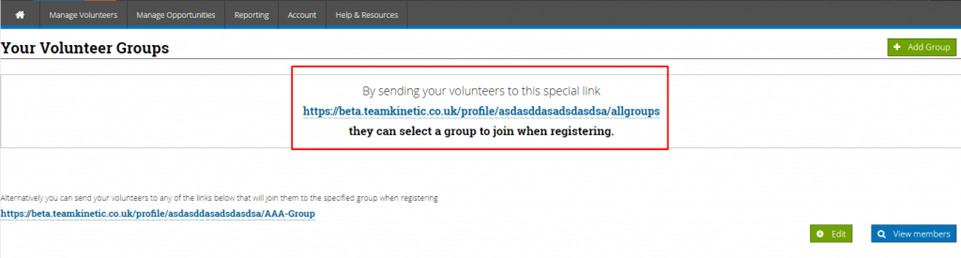
You can send volunteers specific invite URL links, which will allow the volunteer to register on the system and put them in a specific group.

You can either send them to the ‘Choose Group’ link (shown below), which allows the volunteer to register as normal but also asks them to choose a group to be linked to. By sending this link you will be allowing the volunteer to choose from a list of all your volunteer groups.

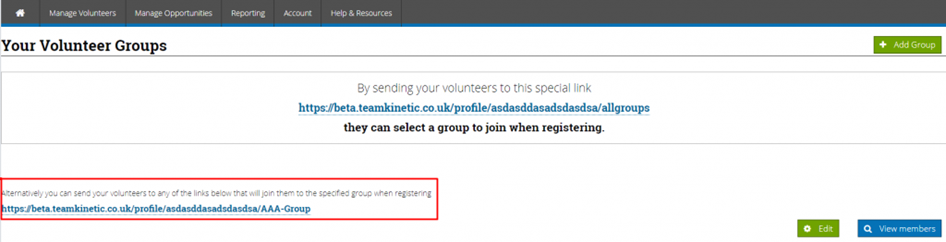
Or you can send them a ‘Specific Group’ link (shown below), which allows let them register in the normal way but also put them in the relevant group (in the screen shot below the volunteer will be automatically put into a group called AAA-Group). Using this option the volunteer will not see a list of your groups and will be unaware that they have been automatically attached to the group.

Using either of these methods will of course mean the volunteer is part of the providers cohort, so the provider can view volunteers’ details and manually attach them to their opportunities.

Logging hours as a provider

Manage opportunities, opportunities, log hours, give feedback to each individual volunteer and click save, then you can log the hours that they have completed. The volunteer may also do this themselves so you can you can also give bulk feedback by clicking bulk feedback and log hours

For those providers who do not need to manually check what hours the volunteers have done, you can use the ‘Log All Hours’ function.

SESSIONAL OPPORTUNITIES: This will check the length of the sessions and log the maximum hours permitted. It will include any sessional opportunity that has sessions in the past that the provider has not yet logged.

FLEXIBLE OPPORTUNITIES: It will list volunteers who have logged more hours than the provider. By logging the provider hours this way, it will match what the volunteer has logged.

What is the difference between a FLEXIBLE and SESSION BASED opportunity?

Session based opportunities have specific times and duration, where flexible opportunities only have a start and end date.

For example;

A Football coach opportunity takes place every Tuesday at 7pm for every week of the year, so there are 52 sessions. Volunteers on ‘Session Based’ opportunities can just click ‘Log Hours’ and the system will automatically log their hours for the length of the session.

A Chair of the football club volunteers different hours each week depending on their availability, so this is a flexible opportunity. Volunteers on flexible opportunities have to enter the ‘Date’ and ‘Hours’ when logging their hours.