Provider support for using Team Kinetic

Registering as a provider.

Go to opportunities.volunteeringkingston.org.uk and click register. You will then be asked to fill in your organisation’s details.

Once you have completed the registration page you will be logged in to your new account. You’ll be greeted by a short tutorial, which will be helpful for first time users.

Once you have logged in you can update your public profile by going to ‘Account’ and ‘Public Profile’ to provide volunteers with information about your organisation and include your organisation logo or photo.

Creating and managing an opportunity

To create an opportunity, click ‘Opportunities’ and ‘Create Opportunity.’ You can then fill out all the boxes with the information relevant to that role.

Click save once you are done and the role will come through to Volunteering Kingston for approval. Please read our guidance document in ‘Resources’ on creating a suitable role description this can be found under the ‘Help and Resources’ tab.

To manage an opportunity, use the options on the left-hand side menu on your opportunity page, here you will be able to make changes to the opportunity, see who has applied and approve of decline volunteers, copy and convert the opportunity and delete the opportunity. If you want to keep the information on the system, such as volunteer hours, we would suggest closing the opportunity rather than deleting it.

What is the difference between APPLICANTS and VOLUNTEERS?

If an opportunity is set to APPLYING then volunteers must apply and be approved by the provider before they are on the opportunity.

When a volunteer applies for an opportunity, the provider assesses them and if they are approved then they will be moved from the applicants list to the volunteers list.  Volunteers can then be assigned to a session on the opportunity.

A volunteer has applied to one of your opportunities, what to do now.

These volunteers have applied to volunteer with your organisation, it is now up to you to contact them to progress their application, this may be inviting them to have a quick phone conversation about the role, or asking them to complete an application form.

You can see who has applied by logging into your account, go to the opportunity, on the left-hand side click ‘Volunteers‘ you will then see a list of all the volunteers who have applied for that opportunity.

If you requested information on their skills and experience hopefully they will have included a short message, but no worries if not. You can view their profile and decide if you want to progress their application. Either way, it’s best practice to let volunteers know the status of their application and why you won’t be taking the application further.

Simply click on the name of the volunteer, click on the three dots on the right-hand side of the page and click on the envelope to write them a message. It is strongly advised you include in here your own organisation contact details.

Creating events

Events are a way of grouping together opportunities and promoting them all as one event.

You can add an event by going to ‘Opportunities’ and ‘Events’ click ‘Add’ to add your event by entering the name of the event, you can then click add and add as much information as you wish about the event including uploading an image. To add opportunities for this event, go to ‘Opportunities’ and ‘Create opportunity’ when asked if the opportunity is part of an event select yes and select the event. You can also add existing opportunities by going to your opportunities and clicking ‘manage’ go to the opportunities ‘Details’ tab on the left and under ‘Opportunity part of an Event’ select yes.

You can ‘Close’ or ‘Open’ an event at any time, allowing you to alternate whether or not volunteers can see the event.

If an event does not have any ‘Open’ opportunities attached to it, then the event will automatically be marked as ‘Closed’. So only events with at least one open opportunity attached to it will be visible in the search results.

Inviting volunteers to apply

If you know a volunteer who is interested in the role, whether they are registered with Volunteering Kingston or not, you can invite them to apply. Go to ‘Manage Volunteers’ and select ‘Invite Volunteers’ you can then type their email in manually separated by ‘,’ or upload a list of email addresses on a CSV file. Just make sure all the emails are on separate lines. They will receive an email asking them to apply; you can re-invite them again in future.

Creating a volunteer group

This is a group of volunteers that can be used for multiple purposes for example: To restrict opportunities only to those volunteers, or communicate ONLY with that group of volunteers etc.

Volunteer groups can be used for multiple purposes including:

  • Limiting an opportunity to only volunteers within a specific group/s
  • Sending emails to a specific group
  • Keeping track of which stages of the enrolment process volunteers have completed.

You can send volunteers specific invite URL links, which will allow the volunteer to register on the system and put them in a specific group.

You can either send them to the ‘Choose Group’ link (shown below), which allows the volunteer to register as normal but also asks them to choose a group to be linked to. By sending this link you will be allowing the volunteer to choose from a list of all your volunteer groups.
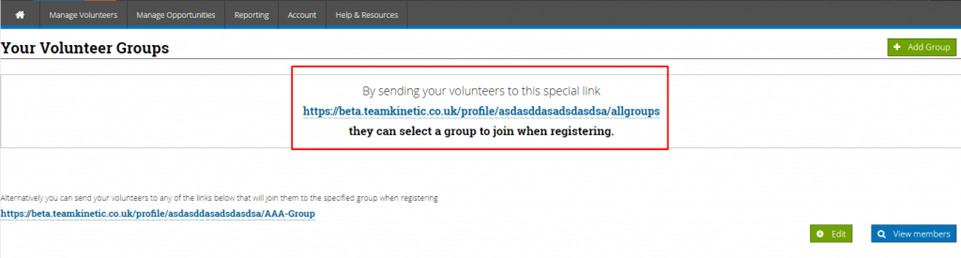
Or you can send them a ‘Specific Group’ link (shown below), which allows let them register in the normal way but also put them in the relevant group (in the screen shot below the volunteer will be automatically put into a group called AAA-Group). Using this option the volunteer will not see a list of your groups and will be unaware that they have been automatically attached to the group.
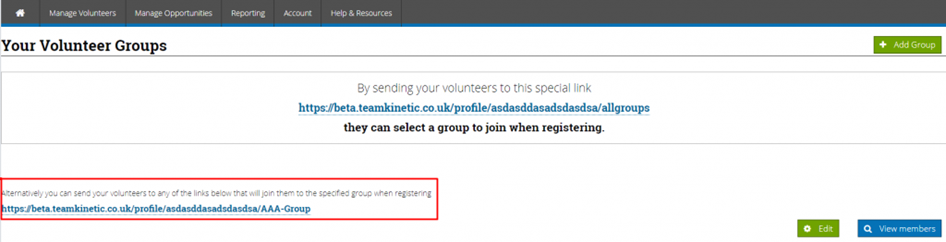
Using either of these methods will of course mean the volunteer is part of the providers cohort, so the provider can view volunteers’ details and manually attach them to their opportunities.

Logging hours as a provider

Manage opportunities, opportunities, log hours, give feedback to each individual volunteer and click save, then you can log the hours that they have completed. The volunteer may also do this themselves so you can you can also give bulk feedback by clicking bulk feedback and log hours

For those providers who do not need to manually check what hours the volunteers have done, you can use the ‘Log All Hours’ function.

SESSIONAL OPPORTUNITIES: This will check the length of the sessions and log the maximum hours permitted. It will include any sessional opportunity that has sessions in the past that the provider has not yet logged.

FLEXIBLE OPPORTUNITIES: It will list volunteers who have logged more hours than the provider. By logging the provider hours this way, it will match what the volunteer has logged.

What is the difference between a FLEXIBLE and SESSION BASED opportunity?

Session based opportunities have specific times and duration, where flexible opportunities only have a start and end date.

For example;

A Football coach opportunity takes place every Tuesday at 7pm for every week of the year, so there are 52 sessions. Volunteers on ‘Session Based’ opportunities can just click ‘Log Hours’ and the system will automatically log their hours for the length of the session.

A Chair of the football club volunteers different hours each week depending on their availability, so this is a flexible opportunity. Volunteers on flexible opportunities have to enter the ‘Date’ and ‘Hours’ when logging their hours.
Microvolunteering Guidance

What is microvolunteering?

Microvolunteering is short actions/activities (ideally less than an hour and certainly

less than a day) that make a different to a cause or people.

What are the benefits of microvolunteering to volunteers?

  • Microvolunteering is accessible, low effort and low commitment.
  • Volunteers feel like they are making a difference and supporting a cause.
  • Flexible so fits in with a busy lifestyle.
  • Good if you want to volunteer but have disability or health issues which would

make a regular role difficult.

  • Volunteers can register their interest in a charity – and sign up to be contacted

about further roles.

  • Can often be online or done from home.
  • It is fun and enjoyable!

What are the benefits to organisations?

  • Meet campaigning goals.
  • If you have no roles or have to reject a volunteer, you can still get them involved

and keep them connected.

  • Spread of awareness of your cause.
  • Help with fundraising.
  • Raise awareness of your charity.
  • Good for involving young people and children.
  • Good for involving people with busy schedules.
  • Might lead to people wanting to do more volunteering in your organisation.

Ideas for microvolunteering projects

Not all of these ideas will work for all organisations and groups, but here are some

suggestions you might want to consider:

  • Writing cards to people who use your service for festivals (e.g. Christmas,

Passover, Eid) and seasons.

  • Writing letters or emails to MPs about an issue that affects your service users.
  • Quick litter picking.
  • Quick research tasks (e.g. researching funders or stock images to go with a

campaign).

  • Completing surveys on a particular topic.
  • Attending an event to raise awareness or money.
  • Contributing to a bake sale.
  • Post messages on social media to promote your campaigns or raise awareness

of your charity.

  • Sort through and transcribe data (e.g. transcribing historical records or

interviews).

  • Drawing a picture or writing about a campaign of yours or your charity (great

for children and young people).

  • Simple craft activities.
  • Citizen Science activities.
  • CV /Job interview support

Next steps

  • Brainstorm microvolunteering ideas – we’re happy to support with this at

Volunteering Kingston.

  • If you’ve got a couple of microvolunteering ideas, you can create a page on your

website to list them.

  • Reach out to people who might be interested such as schools, places of

worships, libraries, youth groups, community centres, older people’s groups and

let them know about your opportunities

Involving younger volunteers

This guide is for Voluntary and Community Sector organisations who want to involve volunteers aged 16 and 17 year olds. We at Volunteering Kingston offer a service for 16+ and we are keen to have more opportunities to offer them.

Why involve younger volunteers?

  • Young people can bring a fresh perspective, energy, enthusiasm and new ideas.
  • To develop young people – their skills, understanding, and aspirations as your potential future.
  • Volunteers for life – Young volunteers can be very committed and develop a long-term connection with your organisation.
  • Access to a wider pool of volunteers.
  • Young volunteers may bring special skills with regards to social media, computer science and other areas.
  • If the service supports young people, service users will appreciate young people volunteering.
  • Increased social cohesion from intergenerational volunteering.
  • Positive reputation – other volunteers, service users and supporters will be pleased you are giving opportunities to younger people.
  • To benefit the young person! Volunteering allows younger people to gain skills and confidence, as well as make new friends.

Where younger volunteers aren’t suitable

People are under 18 are allowed to volunteer however young volunteers may be more vulnerable than adult volunteers. There are therefore some tasks that may be inappropriate for young volunteers. Areas where younger volunteers may not be suitable include:

  • Roles supporting people who display challenging behaviour or supporting very vulnerable people.
  • Volunteering late at night, roles which involve serving/selling alcohol.
  • Roles with a significant amount of responsibility.
  • Skilled roles, such as accountancy.
  • Roles that involve volunteering alone or one-to-one with service users or members of the public.

Keeping young volunteers safe

  • Regardless of the age of your volunteers, organisations have a legal duty of care towards everyone that they encounter.
  • The duty of care is a general legal duty to do everything reasonable in your power to protect people from harm. Your organisation should carry out a thorough risk assessment which covers the risk of involving young volunteers.
  • Under 18s may be more vulnerable to risks due to may lack experience, training and awareness. They need good training, inductions and support and supervision.
  • A separate risk assessment should be completed for younger volunteers.
  • Younger volunteers should never be left alone for long periods or allowed to volunteer with service users or members of the public alone.
  • Clear safeguarding instructions and advice should be shared with everyone.
  • Encourage a culture of openness and mutual respect.

Volunteering hours

There is no legal restriction on the number of hours a young volunteer can do, however, it is best practice to follow employment law limits for your volunteers. Volunteers still in education should not miss school or college to volunteers (although it can be a part of their school’s curriculum). Volunteers shouldn’t give their time very late at night. If volunteering for over 4 hours, an hour break should be given. Young volunteers should be allowed to have at least a 2 week break from volunteering a year.

Safeguarding and child protection

Before you start introducing young volunteers it’s important to assess your safeguarding culture. Make sure you have the following in place:

  • An up to date safeguarding policy which is reviewed regularly.
  • An opportunity for staff to undertake safeguarding training.
  • A code of conduct for adults and young people.
  • A named person who is trained and able to respond to child protection concerns.
  • A separate risk assessment for volunteers under 18.
  • A separate child and young person safeguarding policy that is reviewed regularly.

A DBS check is not required to manage volunteers under 18. Managing volunteers aged 16 and 17 is not ‘regulated activity’ so only a basic check is permitted, not an enhanced check. The DBS outreach service can provide advice on this.

Parent/guardian permission

Generally, for volunteers under 18 you should have parent or guardian permission. However, there are some cases where that may not be suitable:

  • Informal group volunteering (e.g. a day of litter picking).
  • Related to their LGBT identity.
  • They are not in touch with their parents/currently homeless.

These situations should be considered on a case by case basis.

Recruiting young volunteers

  • Engage young people with political issues they are concerned about, for example: homelessness, racism, homophobia/transphobia, the environment. Be clear how the volunteering will make a difference.
  • Hold drop in events and taster days so that young people can try before they commit.
  • Make sure the roles are fun – younger people may get bored more quickly so make sure you keep volunteer activities short and interesting.
  • Be flexible where possible – always offer holidays around exam periods
  • Go to where they are – do an assembly, visit a youth club, make social media videos where they hang out.
  • Think about the skills that young people have and the skills they want to develop. When designing roles for young people it’s great to think about how you can bring those together. Thinking about your own organisation, what roles could you offer young people which would both build on their skills and give them skills? Any ideas?
  • Word of mouth is still the most common way volunteers will find out about your roles. Encourage your adult volunteers to suggest it to young people/parents/carers they know. Once you have younger volunteers encourage them to suggest it to their friends.
  • Publicise your volunteer roles in places that young people go to such as youth clubs, local parks and community spaces.
  • Develop good links with their networks e.g. schools, colleges, youth clubs, scout and guide units and promote your opportunities via presentations and visits, and through attendance at events related to volunteering or freshers and careers fairs.
  • Use your in house social media to recruit using engaging graphics and messages. If you have budget for it consider paid promotions on social media platforms that young people use.

Application process

  • Make applying for the role short and simple if possible. Avoid asking volunteers to complete complex application forms or send in CVs. When a volunteer applies get back to them as soon as possible as many young people will move on if they haven’t heard back from you within 48 hours.
  • Offer them to send you a short video of them explaining why they want to volunteer for you. You can then follow this up with any clarifying questions by phone or text before inviting them in.
  • When interviewing young volunteers, consider having at least one young person on the interview panel if possible.
  • Consider sending a plan for the interview and the questions in advance

Working with schemes, schools and colleges

  • Young people are often interested in volunteering because they are undertaking their Buke of Edinburgh, NCS challenge or it’s part of their schools requirements.
  • Connect with local schools, colleges and youth clubs to offer them your volunteering opportunities.
  • Create group opportunities for the NCS scheme as well as DoE opportunities and work experience projects.
  • This sort of thing is great for projects – for example, if you have an area of the building/garden you want revamped, a holiday clubs activity plan to be devised and supported with, or something else.
  • These kind of projects can take time and effort and it is important to think about capacity – sometimes they can feel like more trouble than they are worth. But when you get them right you can get longer term more regular volunteers who stay with you for a long time.

Retaining your volunteers

Retention is a big challenge of volunteer management, and this is doubly true with younger people. Of course, there are reasons why a young person will have to end their volunteering e.g. leaving home for work or university, or the demands of exams.

  • It is important for young volunteers to have a named contact that they can go to with any questions or concerns. This could be a more experienced volunteer as well as a member of staff. Young people may also lack the confidence to raise issues with the role or explain that they cannot volunteer at the moment –and so may simply ‘ghost’ the organisation.
  • Get to know your volunteers, if you understand what motivates them you will be able to keep them engaged for longer.
  • Discuss with them when they may be busy and offer to hold the role open, for example, giving them a break during revision and exam periods.
  • Make it clear that you are open to hearing their feedback on the role and emphasise that it has to work for them.
  • Hold regular reviews of the volunteering, and if suitable, offer them more responsibility or a different role.
  • Hold socials and parties for the younger volunteers, for example at festive occasions (Christmas, Eid, Diwali etc.) or at the beginning of summer or after a big project.
  • Set a volunteering reward scheme, collecting badges/levels/ certificates for a certain number of volunteer hours.
  • When advertising the role, while being positive, be clear about any challenges that there are.
  • Explain why reliability is important in a non-judgemental way.

Management

Don’t assume too much about younger volunteers, they are varied as people of any age. However, below are some hints to bear in mind.

  • Be clear on expectations. You may have to make some matters of etiquette clear that would be obvious to an older volunteer.
  • Create a manual with guidance and encourage them to check it first if they have questions.
  • Offer an older ‘buddy’ volunteer to provide advice/mentoring.
  • Because we live in a much more digital world, younger people tend to have much less experience in making telephone calls, especially ‘formal’ ones. If you are asking them to use the phone, let them know that this will be required at the beginning of the process and consider providing ‘scripts’ to use on the phone.
  • If you need to let them go then try and have a mature conversation with them about it.

Guidance on Writing Role Descriptions

Writing role descriptions is a key element of attracting the right volunteer. It can be a challenge. This guide will give some pointers and ideas to get started. Read this document first in this section.

Research

· Look at similar roles at other organisations. Be careful not want to copy their language, but it can be interesting to see what they focus on and the tone they use.

· If you have any volunteers within your organisation, you could ask them about their experiences volunteering and why they were interested in volunteering with your team.

· Have statistics to hand about your organisation and the difference it makes.

Motivations

What are people’s motivations for volunteering?

Do you think the best volunteers will be most motivated by your cause or the role?

· For some roles, volunteers are attracted mainly by the cause. For example, supporting someone impacted by homophobia, giving talks on the importance of recycling or volunteering at a food bank.

· For others, the role itself may be the main attraction. For example, shop assistant at a charity shop, writing copy for a website or a fun day of corporate volunteering.

· Most volunteers are motivated by both cause and role – but it is useful to reflect on what you should focus on when writing the role description.

Mind map all of the motivations potential volunteers may have regarding your role. You can use this as a guide for how you write your role description.

Writing the role description

· See the role description template for more information.

Avoid any suggestion of job substitution

As an organisation involving volunteers you will be aware that volunteers are giving their time, and should be viewed and treated differently to staff. You will also be aware that volunteers should not be used as an alternative to paid staff (this is called job substitution).

When writing role descriptions, it is very important to avoid any suggestion of job substitution for the following reasons:

· If someone is not paid but is treated like an employee that is not volunteering, it is a breach of minimum wage legislation. A ‘job description’ could be (and has been) evidence in a court case.

· If people think from first glance that it is a job and then realise they won’t be paid they may be disappointed and annoyed.

· Volunteers might get confused about your organisations expectations of them – for example that they must volunteer.

· You could receive negative press or public criticism.

Instead of …Say/write …
WorkingVolunteering/helping/supporting/giving time
Job descriptionRole description/volunteering advert
JobRole/activity/task
ContractVolunteer agreement

Avoiding saying ‘voluntary work’ as that can be confusing. The phrase ‘youth work’ is an exception because it is a technical term.

You can ask for CVs or application forms if it is suitable for the role – but only if it really matters. If you are recruiting for a volunteer with marketing experience a CV makes sense, but if you are recruiting for a volunteer to stuff envelopes then it is unlikely to be necessary. Do not ask for a cover letter, but you might ask for a paragraph on the person’s experience.

Register and tone

The register (how informal or informal) and tone of your role description depends on the role you are recruiting for and the audience you are targeting.

Generally, when writing volunteer role descriptions, a more informal register is better. Try to avoid jargon. If you are finding this a challenge, imagine explaining the role to a friend or relative who doesn’t work in a related field.

Make sure that you proof read it for spelling mistakes. If you are using Microsoft Word, go to the ‘Review’ tab at the top and newer versions should have a ‘Read Aloud’ function which will help catch errors. Avoid using acronyms (aside from really common ones like ‘NHS’ and ‘BBC’).

Think about the following words and how they fit with the role you are advertising for:

WarmCampaigningChattySeriousPolished
AuthoritativeFunLaid backSpecialisedFormal
DirectResponsibleInformalOpenCreative

Consider the following example sentences for role descriptions:

· We want kids who are going through a tough time to enjoy a summer of fun.

· Some of the people that we support are vulnerable, so volunteers must be willing to undergo an enhanced DBS check and reference check.

· Just turn up on Tuesday at 9am (in clothes you don’t mind getting muddy) for a quick briefing and then get ready to plant trees!

· Volunteers will need to be confident users of Microsoft packages.

Accessibility

It’s important to ensure that roles are accessible. Disability equality activists have the slogan “nothing about us, without us” – the includes volunteering and taking part in charitable activities.

 You might want to consider the following options for your role description – get in touch if you’d like any support with any of this.

· Easy Read – ‘Easy read’ refers to the presentation of text in an accessible, easy to understand format. It is often useful for people with learning disabilities, and may also be beneficial for people with other conditions affecting how they process information. (source) Get in touch with us if you’d like support to create an Easy Read document.

· Audio – You could record the information being read out loud to make it accessible to blind and partially sighted people, or people who have to blind and partially sighted people, or people who have visual processing difficulties.

· Large print – Suitable for partially blind people. Large print is generally 16 to 18-point size. Giant print is anything larger than this. Regular print is usually 10 or 12 point. (source)

· BSL – You could pay for a BSL interpreter to translate the advert and sign it in video form. You could include a link to the video in the opportunity description.

· Discussion – Offer to explain the role over the phone to someone who would find that easier. Equality and diversity It is very important when recruiting volunteers to:

Equality and diversity

· Use plain English, writing in everyday language.

· Unless you want to restrict a role to a particular gender (e.g. a companion who takes someone swimming), don’t use gendered language – e.g. asking for ‘mums’. Always use ‘they’ rather than ‘he or she’ and don’t assume people’s pronouns.

· In photos/images consider groups of people that reflect the diverse population of Waltham Forest.

· People who celebrate Christmas are often interested in volunteering at this time and so it often a big time for recruitment. It’s important to remember that not everyone celebrates Christmas – consider mentioning other religious and cultural festivals.

· Refer volunteers to us if English is not their first language and they need support.

Guidance on supporting unsuccessful volunteers

  • Always let volunteers who apply know whether or not they got the role.
  • Thank volunteers for their time spent applying.
  • Remember that volunteering can be an emotional response to support a cause or community that is close to a volunteer’s heart. It is important that you are empathetic towards that. Offer them alternative ways of getting involved and supporting the cause, for example social actions or micro volunteering. This might include community litter picks, promoting a campaign on social media, or holding fundraising parties for charities.
  • Contact the Volunteering Kingston team for more ideas on creating social action and micro volunteering activities.
  • Refer them to the Volunteering Kingston team for advice and support on finding a role.
  • If you interviewed a volunteer, you can offer to give them feedback on their interview.

Does your volunteer role require a DBS?

Important to know about DBS checks

  • DBS checks are not required for all volunteering roles.
  • It’s very important that we request the right level of DBS checks for the nature

of the role.

  • The Basic DBS check is the only check that is available to all roles.
  • For Standard and Enhanced DBS checks only, people with a DBS can register on

the update service. This means that their records will be regularly updated and

the council can check them once they have permission from the volunteer. It is

free for volunteers. Volunteers, once they’ve received their check, must register

for the Update Service within 30 days of the certificate being issued.

  • For some people, disclosing all the information for a DBS check might be

sensitive. For example, if they are transgender and do not want their previous

names to be on their DBS certificate or have changed their name due to

domestic abuse. Once the volunteer has been asked to make an application they

are advised to contact: sensitive@dbs.gov.uk or Sensitive applications team,

Customer services, PO Box 165, Liverpool, L69 3JD.

Use the online tool to help you

This tool is from the DBS service. It refers to ‘employees’ but in this situation the

guidance also applies to volunteers.

https://www.gov.uk/find-out-dbs-check

More advice

Contact the Volunteering Kingston team or the DBS Outreach Officer: Kiranpreet

Rehal, Kiranpreet.rehal@dbs.gov.uk